Facebook Conversions API (CAPI), czyli obecnie Meta Conversions API, to sposób wysyłania zdarzeń marketingowych z serwera do Mety. Uzupełnia Meta Pixel, który działa w przeglądarce. Najlepsze wdrożenie zwykle łączy oba źródła: Pixel i CAPI, z deduplikacją tych samych zdarzeń po event_id.
W skrócie
- CAPI nie zastępuje automatycznie Pixela. Najczęściej działa razem z nim.
- Główna korzyść to stabilniejszy pomiar, mniejsza zależność od przeglądarki i lepsza jakość sygnału dla kampanii.
- CAPI nie omija zgód ani RODO. Zdarzenia po stronie serwera też muszą respektować zgody i politykę prywatności.
- Kluczowe elementy wdrożenia: zdarzenia standardowe,
event_id, hashowanie danych, deduplikacja, testy i monitoring. - Największe ryzyko: podwójne liczenie konwersji albo wysyłanie zdarzeń bez właściwej podstawy prawnej.
Słowniczek pojęć
- Meta Pixel — kod JavaScript działający w przeglądarce.
- Conversions API — wysyłanie zdarzeń do Mety po stronie serwera.
- Event ID — identyfikator zdarzenia używany do deduplikacji Pixela i CAPI.
- Event Match Quality — ocena jakości dopasowania zdarzenia do użytkownika w systemach Mety.
- Hashowanie — przekształcanie danych, np. e-maila, do postaci skrótu kryptograficznego.
- Deduplikacja — łączenie zdarzenia z Pixela i CAPI, aby nie policzyć go dwa razy.
Pixel a CAPI
| Element | Meta Pixel | Conversions API |
|---|---|---|
| Miejsce działania | przeglądarka | serwer |
| Zależność od przeglądarki | wysoka | niższa |
| Dostęp do danych transakcyjnych | ograniczony do frontu | większy po stronie systemu |
| Ryzyko blokowania | wyższe | niższe |
| Wymóg zgód | tak | tak |
| Najlepsze użycie | zachowanie na stronie | stabilne zdarzenia konwersji |
W praktyce Pixel nadal dostarcza ważny sygnał o zachowaniu użytkownika na stronie, a CAPI wzmacnia zdarzenia po stronie serwera.
Jakie zdarzenia wysyłać
Najczęstsze zdarzenia e-commerce:
ViewContent,AddToCart,InitiateCheckout,AddPaymentInfo,Purchase.
W lead generation:
Lead,CompleteRegistration,- rozpoczęcie formularza jako zdarzenie niestandardowe,
- kwalifikowany lead importowany z CRM.
Nie warto wysyłać wszystkiego jako najważniejszego zdarzenia. Kampanie powinny uczyć się na zdarzeniach możliwie bliskich wartości biznesowej.
Deduplikacja po event_id
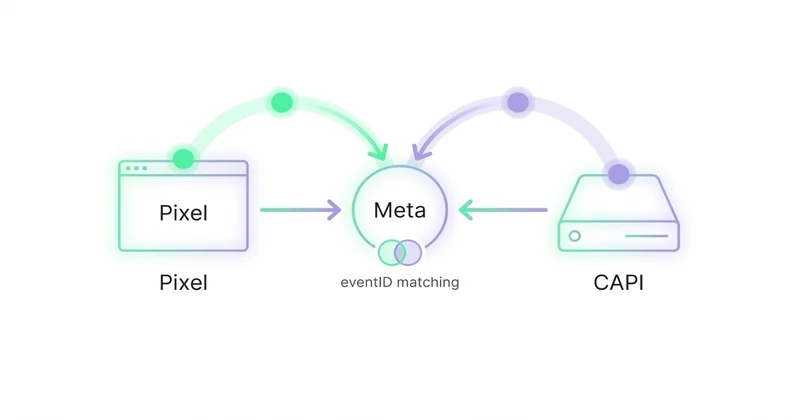
Jeżeli to samo zdarzenie jest wysłane przez Pixel i CAPI, Meta musi wiedzieć, że chodzi o jedną konwersję. Do tego służy event_id.
Przykład logiczny:
Purchase z Pixela: event_id = abc123
Purchase z CAPI:   event_id = abc123
Meta rozpoznaje jedno zdarzenie, a nie dwa zakupy.
Brak deduplikacji może zawyżyć raporty, pogorszyć decyzje budżetowe i wprowadzić szum do optymalizacji.
Dane użytkownika i prywatność
CAPI może wykorzystywać dane ułatwiające dopasowanie zdarzenia, np. e-mail, telefon, adres IP, user agent lub identyfikatory kliknięć. Dane osobowe powinny być normalizowane i hashowane zgodnie z dokumentacją Mety.
Należy też zadbać o:
- zgodę marketingową tam, gdzie jest wymagana,
- aktualną politykę prywatności,
- umowę z dostawcami narzędzi,
- ograniczenie zakresu danych,
- retencję,
- mechanizm bramkowania zdarzeń po stronie serwera.
CAPI jest narzędziem pomiarowym, nie obejściem prywatności.
Sposoby wdrożenia
Najczęstsze warianty:
- integracja platformy e-commerce,
- wtyczka do WooCommerce lub Shopify,
- server-side Google Tag Manager,
- własna integracja backendowa,
- narzędzia partnerskie,
- Meta Conversions API Gateway, jeśli pasuje do architektury.
Wybór zależy od skali, technologii sklepu, budżetu i kontroli nad danymi. Najważniejsze, aby wdrożenie było testowane i monitorowane, a nie tylko „włączone”.
Testy po wdrożeniu
Po konfiguracji trzeba sprawdzić:
- czy zdarzenia docierają do Events Managera,
- czy nazwy zdarzeń są zgodne,
- czy wartości i waluty są poprawne,
- czy
event_iddziała, - czy nie ma podwójnego liczenia,
- czy dane są hashowane,
- czy zgody blokują zdarzenia wtedy, gdy powinny,
- czy Purchase zgadza się z systemem sklepu.
Warto porównać dane Meta, GA4 i platformy sklepowej. Różnice będą istnieć, ale powinny być zrozumiałe.
Jak podchodzimy do tego w Space Ads
Conversions API traktujemy jako wdrożenie danych, nie prostą integrację techniczną. Najpierw wybieramy zdarzenia o wartości biznesowej, sprawdzamy zgody i sposób bramkowania, a dopiero potem łączymy Pixel z serwerowym wysyłaniem zdarzeń. Kluczowe są wspólne event_id, poprawna kwota i waluta Purchase, identyfikatory produktów, hashowane dane użytkownika oraz monitoring Event Match Quality. Po wdrożeniu porównujemy dane z Mety, GA4 i platformy sklepowej, bo różnice są normalne, ale podwójne liczenie albo brak zdarzeń muszą być wyjaśnione. Dobre CAPI daje algorytmowi stabilniejszy sygnał; źle wdrożone potrafi zawyżyć wyniki i prowadzić do błędnych decyzji budżetowych.
Najczęstsze błędy
| Błąd | Skutek | Lepsze podejście |
|---|---|---|
| CAPI bez Pixela | utrata części sygnału frontowego | Pixel + CAPI |
Brak event_id |
podwójne liczenie | wspólny identyfikator zdarzenia |
| Brak bramkowania zgód | ryzyko prywatności | respektowanie zgód na serwerze |
| Błędne wartości Purchase | zły ROAS | kontrola kwoty i waluty |
| Brak monitoringu | cicha degradacja | cykliczny przegląd Events Managera |
Najczęstsze pytania
Czy CAPI zastępuje Meta Pixel?
Najczęściej nie. Najlepsze wdrożenie łączy Pixel i CAPI, a deduplikacja zapobiega podwójnemu liczeniu.
Czy CAPI jest zgodne z RODO?
Może być zgodne, jeśli wdrożenie respektuje zgody, minimalizację danych, hashowanie, politykę prywatności i umowy z dostawcami.
Czy CAPI poprawia wyniki kampanii?
Może poprawić jakość sygnału i stabilność optymalizacji, ale nie zastąpi dobrej oferty, kreacji, strony i struktury kampanii.
Najważniejsze
- CAPI wzmacnia pomiar po stronie serwera.
- Pixel i CAPI powinny być deduplikowane po
event_id. - Prywatność i zgody są obowiązkową częścią wdrożenia.
- Najpierw trzeba poprawnie mierzyć zdarzenia o wartości biznesowej.
- Po wdrożeniu potrzebny jest monitoring jakości danych.
Wdrożenie CAPI z deduplikacją i wysokim EMQ prowadzimy w ramach reklam na Facebooku i Instagramie — bo dobry pomiar to fundament wyniku.
Źródła
Dalsza lektura
Czytaj również

Benchmarki Meta Ads: dlaczego cudze liczby porównują się najgorzej
Benchmarki Meta Ads mogą wskazać nietypowy wynik, ale bez wspólnej definicji celu, metryki i atrybucji łatwo prowadzą do błędnych wniosków. Wyjaśniamy, jak porównywać CPM, CTR, CPA i ROAS oraz zbudować własny punkt odniesienia.


Agencja Facebook Ads (Meta Ads): kiedy zatrudnić i jak wybrać
Dobra agencja Meta Ads łączy strategię, kreacje, pomiar i ekonomię biznesu. Wyjaśniamy, jaki zakres ustalić, o co zapytać przed umową i po czym oceniać jej pracę.

Jak skalować reklamy na Facebooku bez utraty ROAS
Nie da się zagwarantować większej skali przy niezmienionym ROAS. Można jednak ograniczać ryzyko: ustalić próg rentowności, sprawdzić pomiar i zapasy, zwiększać budżet etapami oraz osobno testować odbiorców, kreacje i ofertę.